
Vemco®- NCVRTM- HW
The VEMCO® NCVRTM-HW Industrial CNC Simulator is a high-performance, floor-mounted educational ecosystem designed to bridge the gap between classroom theory and industrial reality. By combining a Large Size Smart Touchscreen with authentic industrial hardware, this console provides an immersive, risk-free environment for students to master complex machining.
The "Dual-Core" Training Advantage
Why choose between a simulator and a machine? VEMCO® offers both in one centralized console:
- Large-Scale Visualization: A massive 4K interactive display ensures every student in the room can follow instructor movements and code changes with total clarity.
- True Hardware Integration: Unlike software-only solutions, VEMCO utilizes a Physical Machine Control Panel (MCP). Tactile knobs, a manual pulse generator (MPG) handwheel, and industrial-grade emergency buttons ensure students develop the real muscle memory required for the shop floor.
Vemco NCVRTM-HW
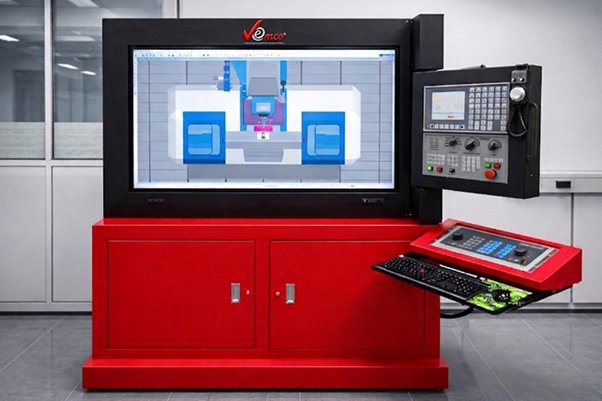
The Interchangeable Software (WinNC)
The simulator comes pre-loaded with the WinNC Control Suite. On a single piece of hardware, users can instantly switch between different industrial control systems. This allows students to become "multi-lingual" in CNC programming without changing machines.
- Siemens : Sinumerik Operate 828D (Turn & Mill)
- Fanuc: 31i (Turn & Mill)
- Heidenhain: TNC 640 (Milling)
- Fagor: 8055
The Dedicated Virtual Hardware (MCP)
While the software can change, the Physical Machine Control Panel (MCP) is a high-fidelity hardware component designed for specific muscle memory. When ordering, you can choose one of the following dedicated industrial hardware layouts:
- Fanuc Edition: Dedicated hardware keys and layout for Fanuc Turning + Milling.
- Siemens Edition: Dedicated hardware keys and layout for Sinumerik Turning + Milling.
- Heidenhain Edition: Specialized hardware interface for Advanced 5-Axis Milling.
Virtual & Physical Hybrid: Toggle instantly between machine controls via an intuitive touch-tab system or use the dedicated physical hardware panel.
7-Inch Diagnostic Screen: A secondary integrated TFT screen on the hardware panel provides dedicated status updates and diagnostics.
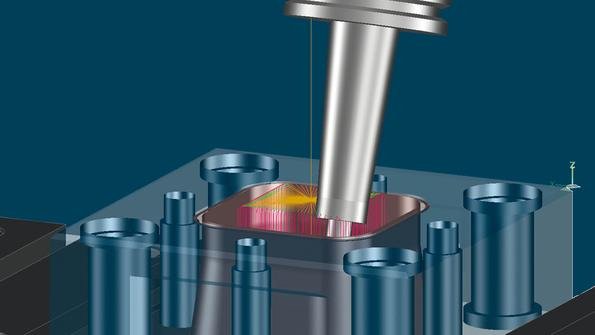
Win3D-View: High-Fidelity Simulation
- Ultra-Realistic Rendering: Tools, blanks, and clamping devices exceed industrial graphic standards.
- Advanced Kinematics: Supports 2-axis Turning and 3-axis to 5-axis Milling.
- Real-Time Collision Detection: Automatically checks tool paths against workpieces and clamps. If a student makes an error, the system triggers a virtual crash alarm—preventing costly mistakes on real machines later.
Note to Educators: Regardless of which physical hardware panel you choose, the Large Size touchscreen can still display and simulate the logic of all other WinNC controllers, ensuring comprehensive exposure to all systems.
Ideal For:
Training Institutes (ITIs) and Polytechnics.
Engineering Colleges looking for Industry 4.0 readiness.
Vocational Excellence Centers and Corporate Skill Hubs.
Rapid Skill Development: Using the EMConfig tool, teachers can reconfigure machine types and control versions for different classes in under 60 seconds.
Authentic Machining Logic
Industrial Execution: Simulates G-codes, M-codes, canned cycles, and subprograms.
Operational Setup: Students must perform part mounting, tool offset calibration, and work offset settings exactly as they would in a factory.
Realistic Environment: Includes zoom/pan capabilities, realistic machining sounds, and visual effects like coolant flow and chip evacuation.